TCP and UDP have ports. These are 16 bit; there are 65535 or so per IP address. These protocols don't care to differentiate between the ports. Elsewhere, IANA presumes to operate a process to allocate "well-known" ports in the range 1-1023, "registered ports" in the range 1024-49151, and to reserve the remainder, 49152–65535, for "ephemeral" ports. The caller end has to have a port, which is how replies get back within the virtual connection, and these are conventionally picked from the ephemeral range by the OS's networking stack. The whole idea of ports is ridiculous, because it allows ISPs to arse around presuming to decide which services they will "not allow". Anything that allows IPSs to do anything other than shift opaque packets will allow ISPs to meddle and break things, and due to the Law of Meddling, if they can, they will. I am currently working around an issue with Claro, a pretend ISP, blocking port 5060, allocated to SI...
This is something I tried and failed to explain to a Computer Science graduate some years ago. The Computer Science graduate assumed I was trying to make a point about seconds difference between UTC and GMT. No. I hope this doesn't count as slop, but Gemini can put it pretty well: User Question 1 what is the conceptual difference betwen a timezone and an offset AI Response 1 While they both help us tell time across the globe, a time zone and an offset are fundamentally different concepts. An offset is a static mathematical calculation, while a time zone is a dynamic geographic region governed by local laws. What is an Offset? An offset is the exact amount of time added to or subtracted from Coordinated Universal Time (UTC) to get the local time. Format: It is always expressed as a plus or minus sign followed by hours and minutes (e.g., +01:00 or -05:00). Nature: It is purely digital and mathematical. Limitation: It does not account for daylight saving time (DST) o...
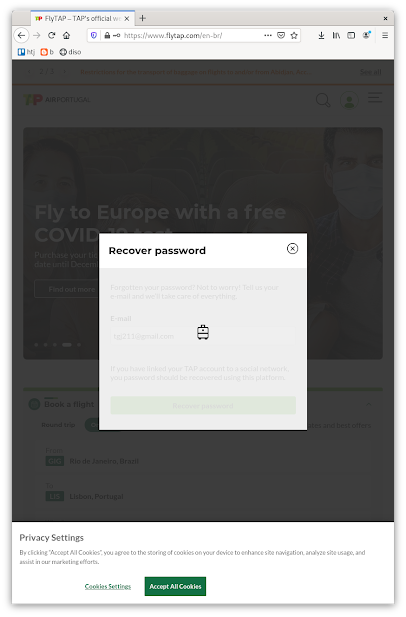
Yesterday, I was unable to book a ticket using either firefox or chromium on flytap.com. The way it failed for a password reset on chromium was different from how it failed on firefox. This morning, the way it's failing on firefox is the same: after entering the email address, it goes into an animation, with more animations happening in the grayed-out background, and never progresses. I checked out as a guest, and used the Austria card, so I could select a cardholder address from the list Afghanistan - Bermuda (it's a bit different this time -- I guess the truncation point depends on the exact size of my browser window). There's realtime SMS reception required for the card payment, and by the time the SMS arrives, the payment page says I'm out of time. Never mind, there's a button to try again, and now the SMS has arrived. But the "try again" button just brings up a blank page under a domain I've never heard of: Look at all this shitfrastructure wor...
Comments
Post a Comment